
Shipping Management Software
Ship every order. With less manual work.
Every order needs a carrier, a label, and a tracking update. Linnworks automates all three, so your team ships more without doing more.
Trusted by retailers worldwide


Faster shipping, fewer steps.
Repeatedly choosing carriers, printing labels, and updating tracking for every order by hand takes time and creates errors.
Carrier selection
Deciding which carrier and rate is cheapest for each order takes hours without a platform to handle it. Linnworks’ Rules Engine assigns carriers automatically, by weight, destination, channel, or your criteria.
Labels and tracking
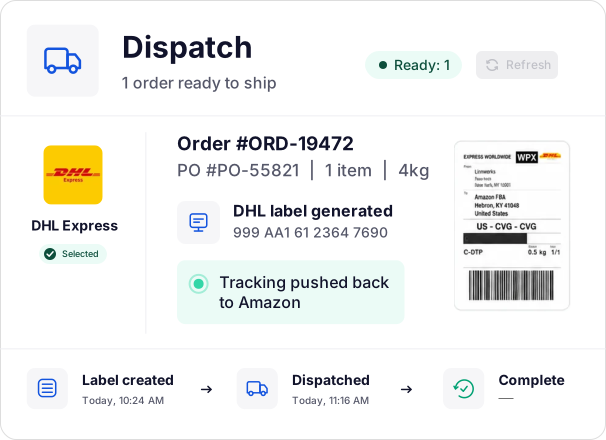
Printing a label in one system, processing in another, then pushing tracking back by hand wastes time on every order. Linnworks does all three from one screen.
Label accuracy
Without a verification step, the wrong label can leave the building, and you find out when the customer does. Linnworks’ additional scan-to-confirm at the packing station catches mismatches first.
From order received to label printed.
Linnworks sits between your sales channels and your carriers. Here’s what happens from the moment an order lands to the moment it ships.
01
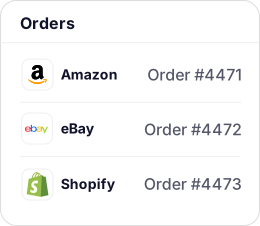
Orders download automatically from every channel
As orders land from Amazon, eBay, Shopify, Walmart, Temu, and your other channels, Linnworks pulls them into a single view. No manual imports, no tab-switching.
02
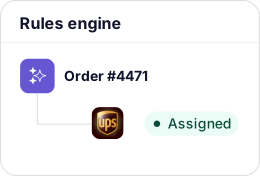
The Rules Engine sorts and routes them instantly
Before your team sees an order, Linnworks applies your automation rules. Every order gets the right carrier.
03
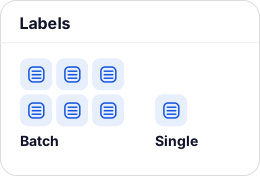
Labels print in bulk or at the bench
Batch ahead of pick waves or order-by-order at the packing station. Both work in Linnworks.
04
Tracking flows back to every channel automatically
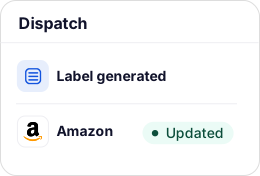
Label generated → tracking logged → channel updated. Your team sends nothing manually.
What’s included in Linnworks shipping management.
70+ carrier and aggregator integrations
Carrier integration software connecting to FedEx, UPS, DHL Express, Amazon Shipping, DPD, EVRi, Royal Mail, Deutsche Post, and more. Plus aggregators like Shippo, ShipStation, EasyPost, Parcelhub, and SmartConsign.
See the full carrier list
Automated carrier selection
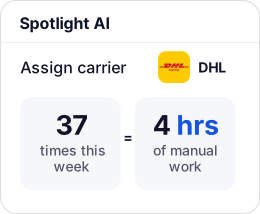
The Rules Engine assigns carriers by destination, weight, channel, SKU, or order value, while Spotlight AI watches manual overrides and recommends rules to eliminate them.
Explore AI & automation
Live rate comparison
See live quotes across supported carriers and quickly choose the cheapest option for each order.
Bulk and batch label printing
Print by pick wave, fulfillment group, or any filter. Labels, packing slips, and invoices generate in the same workflow.
Manifests and tracking records
Auto-generated per shipment, so your team always knows what shipped, when, and via which carrier.
Every major carrier. All in one place.
Shipping that runs itself at any volume.



“With Linnworks, we’re able to have 100% data visibility and transparency, so we can identify where the inefficiencies are and drive the cost out of the system.”

Read the case study

“As Wholesalers of various brands and having our own Kitchen Appliances – Domestic King brand, we always wanted maximum exposure for our products to be sold online on retail websites and marketplace platforms.”


“Anytime we’ve had an issue or needed a custom solution, we reach out and there is immediate action and a resolution.”

Shipping management FAQs.
Get answers to our most asked questions about our shipping management software.
Look for direct integrations with the carriers you use, rules-based carrier and service selection, bulk label printing that can tie to pick waves or fulfillment groups, and automatic tracking sync back to your sales channels. This ensures that no one on your team is manually updating customers or channels after each and every dispatch. Linnworks covers all four, plus live rate comparison across supported carriers.
Yes. Linnworks connects directly to your existing accounts with carriers including FedEx, UPS, USPS, DHL Express, Royal Mail, DPD, EVRi, and Amazon Shipping. That lets you use your own negotiated rates, not a platform rate. If you use an aggregator such as Shippo, ShipStation, or EasyPost, Linnworks connects to those too, passing orders out and pulling tracking back automatically. Adding a carrier account is a configuration step, not an integration project, and your rate agreements remain unchanged.
Automated carrier selection works through the Rules Engine, a no-code builder that assigns carriers and services based on criteria you define: destination, weight or dimensions, order value, channel, SKU, product category, or required delivery speed. Every order runs through your rules before your team sees it, so assignment is automatic and consistent at any volume. Rules can be layered and prioritized. Spotlight AI analyzes 90 days of your team’s manual carrier decisions and recommends the exact rules to automate them.
Yes. Label printing can be configured as part of an automated routing workflow via the Rules Engine. When an order is routed to a fulfillment group or location, label generation can be triggered as part of that action, so labels are ready before your warehouse team starts their shift. For operations that prefer manual control, labels can also be printed individually at the packing station or in batches. Both modes are supported simultaneously.
Linnworks supports bulk label printing across large order volumes, with batches tied to pick waves, fulfillment groups, carriers, or any filter you define. Labels, packing slips, and invoices are generated together in the same print run. For wave picking, labels print per wave, so the packing station is pre-loaded when totes arrive. Order-by-order printing at the bench is also supported, with scan-to-confirm to prevent mislabeling before a parcel is sealed.
When a tracking number is generated, Linnworks automatically pushes it back to the originating channel, whether that’s Amazon, eBay, Shopify, Walmart, TikTok Shop, or any other. The channel receives its fulfillment confirmation, and the customer receives their tracking notification, with no manual action from your team. For 3PL or FBA orders, tracking confirmation is received from the partner and logged in Linnworks, which then updates all connected channels.
Yes. Linnworks integrates with Amazon FBA and 3PLs, including ShipBob and CIRRO Fulfillment. Orders route automatically to the right partner via the Rules Engine, based on product type, destination, or channel. Once sent, Linnworks tracks status, receives confirmation and tracking, and updates inventory across all channels, so outsourcing fulfillment doesn’t create a visibility gap.
Spotlight AI analyzes your team’s order processing over a 90-day window and identifies where manual decisions consume the most time. For shipping, it monitors manual carrier assignments, service-level overrides, and rate selections made outside existing rules, then recommends the exact Rules Engine automations to eliminate them. Customers report saving 20–50 hours per month from Spotlight AI recommendations alone.