
Multichannel Listings Management
Unify your catalog across channels.
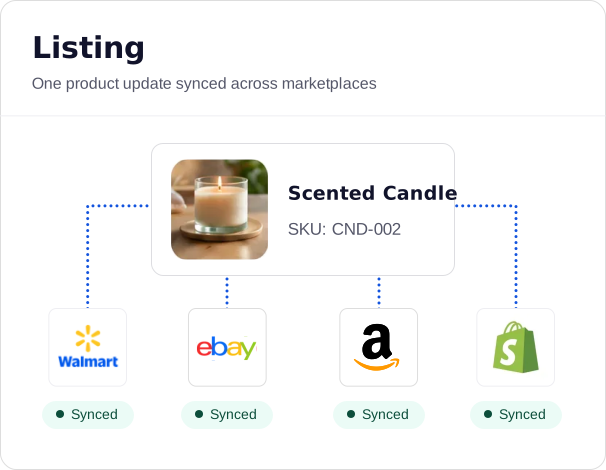
Logging into each marketplace to create or update a listing wastes hours every month. Linnworks connects your products to your most important channels so you can list, update, and sync from one place.
Trusted by retailers worldwide


One catalog. Multiple marketplaces.
Every marketplace wants its own fields, formats, and pricing. Managed by hand, each new channel multiplies the work instead of the revenue.
Channel requirements
Different listing requirements turn something as simple as a pricing change into a multi-layered task. Linnworks’ listing templates map your data to each channel automatically.
New channel launches
Rebuilding a catalog for a new channel’s format can take weeks, often delaying expansion. Once Linnworks templates are set up, adding a channel and listing there is simple.
Listing consistency
When product data lives in separate platforms, prices and descriptions start to drift between them. Linnworks holds a central catalog, so every channel reflects the same accurate record.
How Linnworks listings management works.
Here’s how one product catalog becomes live listings across every channel you sell on.
01
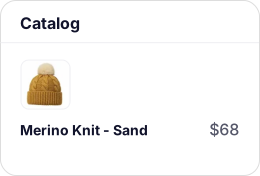
Your catalog is the single source of truth
All your product information (titles, descriptions, pricing, images, dimensions, attributes) lives in Linnworks. Every connected channel pulls from that central record.
02
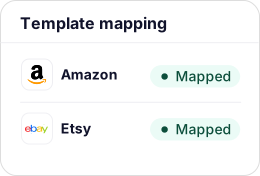
Listing templates map your data to channel requirements
Every marketplace has its own required attributes and formatting. Templates define what each channel needs and where it goes. Set up once per product type, then the system handles field mapping.
03
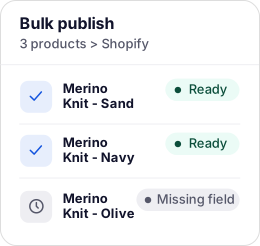
Bulk listings handle up to 500 products at a time
Select products, choose the channel, pick the template, and publish. Required fields are flagged before publishing, cutting listing failures.
04
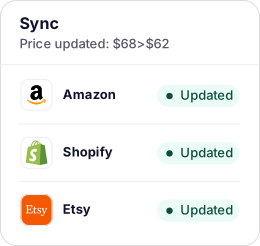
Changes sync automatically
Make price updates, description edits, and title changes in Linnworks, and they push to every connected channel automatically.
What’s included in Linnworks ecommerce listings management.
Listings management is a paid add-on to Linnworks Advanced. Here’s what the module covers.
Centralized catalog
One product record feeds every connected channel. Change it once, and it syncs everywhere it needs to go.
Listing templates
Map your product data to each channel’s required fields automatically. Set up once per product type, then list in a few clicks.
Bulk listing tool
Create or update up to 500 products per channel in a single action, with required fields flagged before publish.
Channel-specific content and pricing
Different titles, images, and prices per channel, all linked back to one SKU, so there are no separate catalog entries to maintain.
Kits & bundles
List a bundle under a single SKU; component stock deducts automatically, with pre-approved substitutions to keep it live.
The channels that matter.
All managed from one place.
Linnworks covers the channels driving the most volume for multichannel retailers. For any gap, our network of partners makes it easy to build a missing integration, so you’re not constrained to what’s natively available.

What one catalog across the biggest channels delivers.



“For us, the adoption of Linnworks was both necessary and revolutionary, and has become an invaluable support system for our business.”

Read the case study

“Linnworks’ flexibility allowed us to connect to our 3PL partner & our couriers to provide automation to our orders. This has resulted in 98% of our orders passing from site to warehouse picker in less than 15 mins.”
Read the case study

“It quickly became hard to keep everything in sync. Stock levels, orders and listings were all being managed in different places, which led to manual work and occasional mistakes.”
Read the case study
Listings management FAQs.
Get answers to our most asked questions about our ecommerce listing management software.
Yes. Linnworks connects to 11 channels (Amazon, Back Market, BigCommerce, Bluepark, eBay, Magento 2, OnBuy, Shopify, TikTok Shop, Walmart, Wish) and lets you create, edit, and manage listings from a single interface, without logging into each platform separately. Your catalog lives centrally; each channel listing pulls from that same record. Any change made in Linnworks syncs automatically to every connected marketplace listing. A price change that used to require logging into four platforms now happens in one action.
The most important things to look for are a centralized catalog that acts as a single source of truth, templates that map your data to each marketplace’s field requirements automatically, and bulk actions to enable catalog-wide changes without editing hundreds of listings individually. Linnworks centralizes your catalog, handles channel-specific formatting, and supports bulk updates across up to 500 products at a time.
Bulk listing works in four steps: select the products, choose the channel, pick the listing template for that product type, and publish. Linnworks creates or updates listings in bulk, changing up to 500 products per channel at a time. Required fields are flagged before publish, so you fix gaps before the listing reaches the marketplace rather than finding out through a failed submission. Once templates are configured, publishing your full catalog to a new channel is a single bulk action.
Yes. Each channel listing is managed independently for title, description, pricing, images, and attributes, but all are linked back to the same central product record. You can have a different title on Amazon than on eBay, a different price on Walmart than on Shopify, and channel-specific images, without separate catalog entries. Changes can be pushed to all channels at once, or to individual channels independently.
Listing templates (called listing configurator templates) define what product information each channel needs and how it should be formatted. Every marketplace has its own required fields and formatting rules. Templates map your central product data to those requirements automatically, so you don’t reformat or re-enter information per platform. Templates are set up once per product type per channel; after that, creating a new listing in that category is a few clicks. The upfront setup is a one-time cost that pays off on every listing after it.
Linnworks lets you create product bundles listed under a single SKU. When a bundle sells, the correct component stock is deducted automatically in the background, so inventory stays accurate without manual reconciliation. Pick-and-pack workflows treat the bundle as a single unit. Pre-approved substitutions can be configured so that if one component sells out, the bundle stays live with an approved alternative.
Once listing templates are configured for your product types, launching on a new marketplace just takes a bit of configuration rather than a full build. Customers report that what used to take weeks manually now takes minutes once the templates exist. The initial template setup takes more time, but it is a one-time investment per product type and channel. After that, new products in that category can be listed on any configured channel in a bulk action.
Listings management is a paid add-on. It includes listing templates, bulk listing management, and channel-specific content and pricing. Because the cost depends on your catalog size and the channels you list to, there’s no single set price. Book a demo, and we’ll walk through what the add-on would cost for your setup.