
Stock Forecasting Software
Order the right stock. Before you need it.
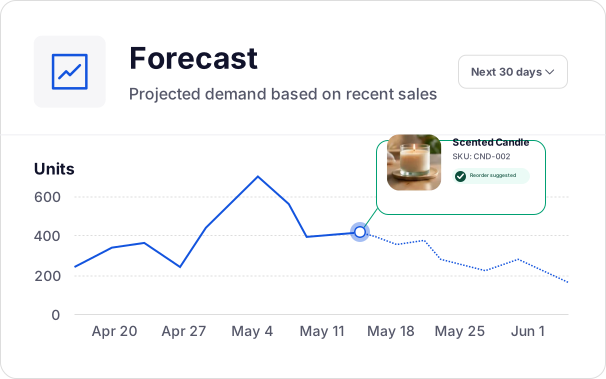
Linnworks forecasts demand from your actual sales history, so buying runs on data instead of guesswork.
Trusted by brands and retailers worldwide





Know what stock to order and when.
Order on instinct and you swing between two expensive mistakes: too much of the wrong stock, and too little of the right stock. Both cost you.
Overstock
Slow-moving stock is cash you can’t spend on what’s selling, and warehouse space you can’t use. Linnworks forecasts from your sales history to help you hold what you’ll actually sell.
Stockouts
When you run out of a best-seller, you lose the order, the search ranking, and sometimes the customer for good. Linnworks’ demand forecasting flags what to reorder before the shelf empties.
Replenishment planning
Manually tracking reorder points for hundreds of SKUs across channels and warehouses takes too long. Set optimal levels once, and Linnworks tells you when to restock automatically.
How Linnworks stock forecasting works.
Your sales history is the input. Reorder points and purchase orders are the output.
01
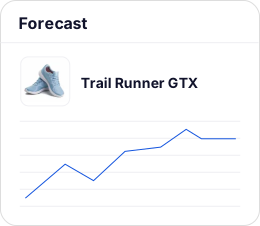
Linnworks learns from your sales history
Built-in forecasting predicts future demand from your actual sales data, specific to the channels you sell on and the locations you hold stock in.
02
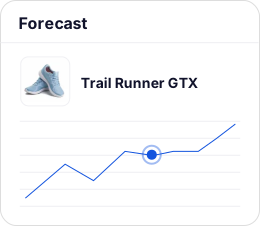
Forecasts adjust as your sales change
Predictions update with current sales activity, so they reflect what’s happening now rather than what happened last quarter.
03
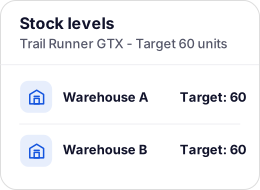
You set optimal stock levels
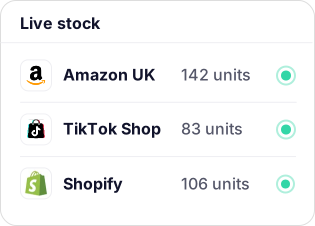
Set target levels from the SKU up to the supplier, across every warehouse location, so each product has a level to replenish back to.
04
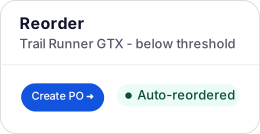
Reordering happens in a few clicks or automatically
Build purchase orders directly from the Linnworks interface, or let the system trigger reordering when stock drops below your set thresholds.
Get more advanced stock forecasting with Linnworks and Inventory Planner together.
For particularly complex and cost-sensitive buying decisions, add Inventory Planner to your Linnworks subscription.
Our built-in forecasting uses your sales velocity and supplier lead times to tell you how much to order and when. It even builds the POs.
Inventory Planner adds greater depth with automatic trend, seasonality, and spike analysis, buying recommendations, open-to-buy, and 200+ metrics to support your inventory health.
| Linnworks built-in | Add Inventory Planner | |
|---|---|---|
| Forecast driver | Sales velocity from your history | Trends, seasonality & spikes, analyzed automatically |
| Seasonality & promos | Adjusted manually | Factored in automatically |
| Output | Reorder quantity + date | Full buying recommendations + open-to-buy |
| Multi-location | Reorder by warehouse | Optimizes what to buy and where it goes |
| Reporting | Core trending & replenishment | 200+ metrics, configurable dashboards, overstock report |
| Best when | You want to stop guessing on reorders | Buying decisions are complex and cash-sensitive |
As a preferred Linnworks integration, we’ll connect you with the Inventory Planner team and roll it into your existing contract.
What data-driven inventory planning does for a growing operation.



“Because of stock forecasting, we’re no longer holding on to too much or the wrong stock, or not selling enough of the right stuff because it’s out of stock.”
Read the case study

“The ROI is 100%. It helps us manage stock and process orders far more efficiently.”

Read the case study

“Before Linnworks, we know all the manual processing equated to approximately 3 members of staff full time. We were losing money on incorrect purchase orders and losing orders by not being able to move quickly enough.”

Read the case study
Stock forecasting FAQs.
Get answers to our most asked questions about our stock forecasting and demand planning software.
Reducing overstock and dead inventory comes down to ordering against actual demand, rather than instinct or fixed quantities. Forecasting from real sales history shows you what’s actually likely to sell, so that you’re not tying up cash and warehouse space in stock that won’t move. Setting optimal stock levels by SKU prevents overstock from building up in the first place.
Stock forecasting is available as a paid add-on to Linnworks Advanced. The built-in module forecasts demand from your sales history and drives optimal stock levels and purchase orders. For more sophisticated demand planning, the Inventory Planner integration adds a deeper layer on top.
The built-in forecasting is driven primarily by your historical sales data, adjusting dynamically as your current sales activity changes. For richer inputs, the Inventory Planner integration layers in trend analysis, seasonality, and supplier lead times, and accounts for unexpected sales spikes when generating buying recommendations. Optimal stock levels can be set from the SKU level up to the supplier, across multiple locations.
Yes, across both. Forecasts are specific to the channels you sell on and the locations you hold stock in. The Replenishment Report breaks demand down by marketplace or sales channel and shows incoming stock and reorder priorities across your warehouses, so you can plan stock movements and allocate to programs like Amazon FBA or Walmart WFS based on channel-specific demand rather than blended averages.
The built-in forecasting picks up recurring seasonal trends from your sales history over time. For precise handling of planned promotions and demand spikes, the Inventory Planner integration factors in trends and unexpected surges when generating forecasts, which is what makes it worth layering on ahead of a significant peak or campaign.
Yes. Once forecasting identifies what needs replenishing and when, you can build purchase orders directly from the Linnworks interface in a few clicks. Reordering can also be automated against the optimal stock levels you set, so the system triggers it when stock hits a threshold rather than waiting for someone to notice the gap.
Alerts are not currently available for stock forecasting. What is available is automated replenishment: when stock drops below the optimal levels you have set, the system can trigger reordering, so you stay ahead of demand without relying on someone spotting a low-stock alert.
When you want to move beyond spreadsheets and know what you’ll need before you need it. If you’re manually tracking reorder points or regularly caught out by stockouts and overstock, the forecasting add-on is the step that removes that guesswork.